Thursday, 18 August 2011

Impress your friends by downloading Firefox, the GEEKY method

Greetings fellow Firefoxers, Firefoxians & Firefoxants... er..I mean firefox lovers.
Get ready to
  • Show off a new GEEKY way to download firefox and impress your friends.
  • Prove that we don't need any other browser to download Firefox.
  • Download Firefox without help of IE in a PC with fresh installation of XP/Vista !
Read the last point again. Download firefox even without IE or any other browser after performing a fresh installation of Windows XP/Vista ?
Gonna install with an installer you already have in your Hard disk or USB Drive ?Very funny. A Big NO. I would end cleaning public toilets in one of the Arab countries for such a sick joke :)
What? Is there really a way to do this?
Yes. Just follow the simple steps and you will know.
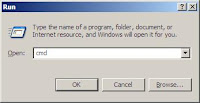
  1. Open the command prompt (Start > Run > Type CMD > Press Enter)
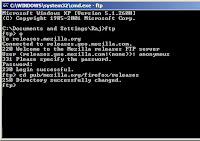
  2. Type in ftp [Enter] - Yes this is it - File Transfer Protocol
  3. Type o [Enter]
  4. Type releases.mozilla.org [Enter] Then it will prompt you for the Username, type anonymous [Enter]
  5. Next it will ask for the password, type techtolarocks [Enter]
  6. Now it must say '230 Login successful.' Congrats !
  7. Next type lcd c:\ and it will respond - 'Local directory now C:\.'
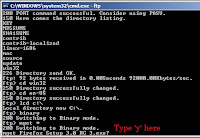
  8. Type binary [Enter]
  9. Next type cd pub/mozilla.org/firefox/releases [Enter]
  10. Then type ls [Enter] (LS in small letters) and it will list all the subfolders
  11. Choose which version you wanna download and type cd <foldername>For example, I need to download RC3 so I will type cd 3.0rc3 [Enter]
  12. Next cd win32 if you are using windows. Linux/Mac users use ls and cd again.
  13. Next type cd en-US [Enter] (choose English - US, For other language use ls)
  14. now type mget * - and it starts to download all the files in that folder.
  15. When it prompts ? for each file just type in y
  16. After downloading your favorite firefox installer, find it in c:\
Related Images


If you really liked this article, your simple 'thanks' or 'stupid' as a comment will make my day. You can also subscribe to my feed here or receive email updates using the form on the top right corner of the blog.

How to hide folders in Windows XP - A Superb way


I have come across many methods to hide folders in XP, but I personally like this very much because its very easy, fast & useful. Also, showing off this trick before your friends will definitely fetch your ears a big WOW !
You can use this to hide your folder in an office computer, in a public browsing center or even your own friends computer.
Ok now lets get ready. Here is the scenario. I have got a folder which I need to keep as a secret in my PC. I will show two alternatives to do it by using the same trick.
Method 1:-
  1. Copy the folder to your C:\ (Any other location is also fine)
  2. Right click it, click Properties. Now select the Customize tab.
  3. Choose 'Change Icon' under folder icons.
  4. Choose a file icon (INI, TXT or Icon for files without extension)
  5. Then apply it, and rename it to something obvious like Instlog.ini, boot.ini, Tmplog etc.
  6. This method has proved to be very effective as no one will even care to open a temp file, ini file or a file without extension. Check this picture for final result.

    I did this in my office computer. I had almost 10-15 games and movies, but my Manager was never able to find any even after using the PC for 3 days :)
Method 2 (Another variation) :-
  1. Repeat the first 3 steps as given above.
  2. This time don't place the folder in C:\ D:\ Directly. Instead you should create a folder called Recycler, Recycled etc. and place the secret folder in it.
  3. While choosing icon choose the blank icon. Click here for Figure.
  4. Now apply and you will see the icon is invisible !
  5. But there is still a name floating, so make the name also blank.

    WAIT A MINUTE. I CAN'T USE THE SPACEBAR OR BLANK AS NAME !
  6. Here is the solution. Select the folder and press F2. Now hold down ALT key and press 255 on the num keypad then release the ALT key and press ENTER.
  7. Now I think I can hear a WOW :)
Update:- Well, I'm not trying to say that this is the best way to hide folders on XP. But you might like it as it is easy and fast to do. Moreover it does look cool when the icon is completely blank even if its not for hiding.

MAKE UNLIMITED FREE CALLS WORLDWIDE !


Its has not been very long since someone came up with an idea to mix advertisement with sms to provide absolutely FREE SMS through the internet. The result of which was a bunch of sites which sprang in various countries offering free sms among which, one of my favorite 160by2.com has been doing well in India.
Now Parrot Media, an Israeli based company founded in 2007 has taken this industry to the next step to provide absolutely free calls worldwide by mixing clever advertising tactics with it.
Now you can make FREE unlimited calls of 2-5 mins each to any landline or mobile number on planet earth. You have to register in the site to use their service.
Check out their FAQ page to know more. I have already spoken to all my friends who live abroad using this fabulous service & it works FINE !
I wonder why such a site has not been covered by blogging sites like TechCrunch yet.
Link to site - www.parrot-media.com

Think.learn.io - blog with a cool name and cooler posts !

http://think.learn.io/ - thats the URL.
Today while going through this post on QOT, I happened to click on one of the commentators blog URL as it was unique. Now I know why, names matter a lot :)
I found 2 posts which I felt I should share with my readers. It seems like the blog template is broken and even the feeds don't work. So I am forced to copy and paste the text from the site.
Create CON folder in Windows operating system.
The reason for this is that the following words are reserved words in DOS. Try and create a folder with any of the following names:
CON,PRN, AUX, CLOCK$, NUL, COM1, COM2, COM3, COM4, COM5, COM6, COM7, COM8, COM9, LPT1, LPT2, LPT3, LPT4, LPT5, LPT6, LPT7, LPT8, and LPT9
start -> Run -> CMD
c:/>mkdir \\.\c:\con
Remove folder
c:/>rmdir \\.\c:\con
Note by Quakeboy - This trick is cool. You will not be able to create folders with the names given above directly using right click. You can do it only through the above method. After creating you won't be able to delete it using DEL, SHIFT DEL or even Right Click -> Delete. Now you can ensure that no one deletes your folder easily on a shared computer.
Check your antivirus !!!
X5O!P%@AP[4\PZX54(P^)7CC)7}$EICAR-STANDARD-ANTIVIRUS-TEST-FILE!$H+H*
Open notepad..........Copy the above code in the file....then save it with the name Test.exe If this file got deleted immediately ....that means ur antivirus is working n updated!!!
Write a C program without using ; at the end of each line.
#define ; z
main()
{
int a, b, cz
printf("Enter the first value:")z
scanf("%d", &a)z
printf("Enter the second value:")z
scanf("%d", &b)z
c = a + bz
printf("%d + %d = %d\n", a, b, c)z
}
Click below for an extra cool funny page for people who know C programming !
http://think.learn.io/fun.html

Scrabulous, the famous game by Indians - banned from Facebook


Looks like bad news for millions of Facebook users - Scrabulous, the famous Facebook app by 2 Indians Rajat and Jayant Agarwalla, from Kolkata has been banned due a law suit by Hasbro. They say, the game closely resembles their original board game - Scrabble.
If you did not know what scrabulous was, get ready to experience it here at www.scrabulous.com. You can even play it with friends all around the world. The site design closely resembles Facebook site's design.
You can also play it over e-mail. So no need to worry if internet is blocked at your work place.

Now chat in Native Indian languages in Google Chat !


"Sometimes there's just no substitute for expressing a thought in your own language." - Google Talkabout blog.
Now add spice to your chat conversations by directly chatting in native Indian languages. Google Talk team has introduced 5 more transliteration bots just for Indian Users.
If you want to transliterate to Tamil, add en2ta.translit@bot.talk.google.com in Gmail chat or Google Talk.
List of transliteration bots
To get your messages transliterated, you can add these bots
Languages Bots*
English to Hindi en2hi.translit
English to Kannada en2kn.translit
English to Malayalam en2ml.translit
English to Tamil en2ta.translit
English to Telugu en2te.translit
* don't forget to add @bot.talk.google.com
Steps to Group Chat in Native Language
To make the chat better, you can create a group chat session. Follow the steps in your GMail chat.
  1. Add en2ta.translit@bot.talk.google.com as a friend.
  2. Next start a chat conversation by clicking on the added bot.
  3. Invite more friends and make it a group chat.
What can be improved in this ?
The only irritating thing I found was that every text is displayed twice, both in english and in native language. Instead if the Gmail chat team does something to supress the english text, it will be really cool... and not cuil :P
Hey, the native fonts don't appear properly !
If you use anything other than IE6+ or Firefox 3, the fonts won't appear properly. Check this link to solve this problem.

To Format or Quick Format ?

Long ago I had an amazing computer hardware lecture session, at the end of which the tutor failed to answer one simple question I had asked - "What is the difference between format and quick format option ?"

Now Google has helped me find the answer to that same question. Do you want to know too? Then read on.

The difference lies in checking the disk for bad sectors which is not performed in a quick format.
But in a normal format, the majority of the time is consumed by the process of scanning bad sectors.

So perform a quick format when you are sure that your hard disk is devoid of bad sectors. Otherwise if data is written on bad sectors, you will soon suffer data loss.

Source